Compressor Basics
A compressor actively monitors incoming audio signals and, based on its configured parameters, decreases the volume whenever a signal peak is detected. This process is analogous to manually adjusting volume levels, yet a compressor accomplishes this adjustment within milliseconds, often imparting its unique sonic character through saturation and distinctive attack/release slopes. Some compressors are purposefully designed for specific instruments or applications; for instance, a buss compressor is tailored for use on a group of audio tracks, while a mastering compressor is typically applied to the final master buss of a song. However, these are mere recommendations, and these effects can be employed creatively on any audio source.
You might be curious about the necessity of adjusting the volume of a signal in this manner. Well, the reduction of audio signal peaks serves the purpose of creating additional "headroom," enabling you to amplify the signal without introducing distortion or pushing it beyond 0dB on a mixer. This capacity to increase the volume of a sound also facilitates the clearer perception of quieter elements within the sound compared to a more dynamic audio signal. Additionally, compressors possess the capability to alter the overall characteristics of a sound, whether it involves enhancing or diminishing the attack/transient or adjusting the sustain of the sound.
Compressors represent one of the more challenging tools to master and comprehend. Despite their seemingly straightforward principles, it often takes years for individuals to develop a profound understanding of the intricate ways in which a compressor shapes the audio.
Controls Overview
Compressors are available in a variety of styles, ranging from those with sophisticated controls for signal detection to simpler models equipped with just two knobs.
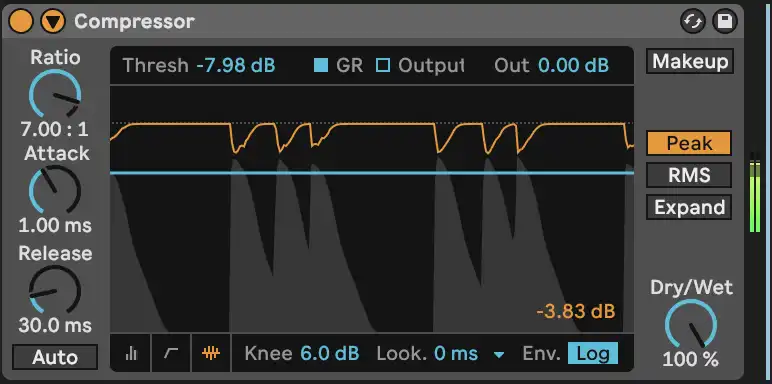
The image below illustrates the waveform view of the stock Ableton compressor. While it features numerous knobs and icons, it serves as a representative example of the most prevalent features found in compressors.
Threshold
The threshold parameter (Thresh in this example) establishes the level at which the compressor initiates the reduction of the signal. Any audio surpassing the threshold begins to undergo volume reduction. Threshold is fundamental to a compressor, determining the extent of compression applied.
Ratio
While the threshold determines when the compressor engages, the ratio defines the degree of compression following the threshold. The Ratio, expressed as a ratio of decibels reduced per decibel above the threshold, determines the compression intensity. For instance, with a 2:1 ratio and a -10dB threshold, a signal peaking 4dB above the threshold undergoes a 2dB reduction, as the compressor halves the value for each dB above the threshold.
Ratios can range from 2:1 all the way to infinity:1, with an infinite ratio acting as a unique type of compressor called a Limiter that does not allow any sound above the set threshold.
Attack
The Attack parameter governs how swiftly the compressor begins reducing a sound once it exceeds the threshold. Compressors, especially analog devices, introduce a slight delay before activation. Attack times vary between compressors, typically ranging from 1ms to 200ms. Longer attack times preserve most of the loud signal before compression, emphasizing transients, while shorter times can attenuate transients.
Release
Similar to Attack, Release determines how long the signal continues to be compressed after falling below the threshold. Longer release times yield smoother volume changes, creating a pumping effect if another transient emerges before the compressor fully disengages. Some compressors, like the Ableton example, offer an "Auto" function for release, allowing the compressor to autonomously decide the timing based on the incoming signal—particularly useful for varied or unpredictable sounds.
Make-up Gain
Make-up Gain is a straightforward parameter that increases the volume, acting like a standard volume control. Necessary after the compressor attenuates the signal, it restores the volume to maintain perceptual consistency. This adjustment can be manual, adjusting the output volume, or automated, with some compressors featuring a Make-up Gain option that strives to maintain the pre-compression sound level automatically.